
Download
RDPlus For Windows is compatible with the following 32/64 bit Microsoft’s Operating Systems:
 Windows 11Windows 10Windows 8.1Windows 8Windows 7Windows VistaWindows XPServer 2022Server 2019Server 2016Server 2012 R2Server 2012Server 2008 R2Server 2008Server 2003SBS 2011SBS 2008SBS 2003
Note:
It is recommended to use the Professional and Ultimate versions of Windows for all RDPlus servers.
- Windows Home Editions are not supported.
- On Windows Server 2016, 15 sessions maximum are allowed for Remote Desktop access.
- Windows Server 2016, 2019, 2022 Essentials Edition is not supported nor recommended for using RDPlus.
New Activation Key Licensing System
We are proudly to announce that we have introduced a new licensing system designed to allow:
- Easy activation: no more “license.lic” or “support.lic” files
- All products at once (RDPlus, add-ons and more to come)
- Self-service rehost
- Better hardware identification (including cloud and virtual machines awareness)
From now on, when you will need to active a RDPlus license, simply click on “Activate your license” in the license tab and enter your activation key. You will get a list of all the available licenses/supports assigned to this activation key, i.e. all licenses/supports not activated yet.
Migrating from Legacy to Key Licensing System on an Existing Server
If you are already one of our customer and you want to migrate to the new licensing system, simply run the UpdateRelease on an existing server with an existing activated RDPlus 12 or lower in order to update RDPlus and access the Activation key system.
UpdateRelease will automatically migrate the existing license and support into the Activation key system.
Download Full Version – Enterprise Edition Trial License Included (15 Days, 5 User)
RDPlus (Activation Key Licensing)
v16.0.1.20
(updated on 20/01/2023)
for all supported operating systems.
*15 Day Trial License
Included*

v16.0.1.20
(updated on 20/01/2023)
to the latest one.
*Support Subscription Required*
RDPlus Legacy (Serial Number Licensing)
Improvements
- RDPlus 16.0 includes all the improvements and fixes released in previous versions
- HTML5: you can set LPW accepting secret phrase in query string
- ConnectionClient: added French translation for LB error
- Web Credentials: improve security of sensitive data
- Updated Chinese translations
Fixes
- Fixed connection issue for users with special characters
- File transfer: contextual menu was not showing on the first element of file/directory list
- HTML5 Top Menu: fixed icon not found while configuring application
- RemoteApp: fixed connection from an application server web portal using reverse proxy (url: gateway/~~server_name) redirecting to the gateway
- Application Panel: fixed array dimension range exception occurring when using application folders
- HTML5: fixed Chrome’s outdated SSL connection issues when downloading files
- AdminTool: fixed unhandled exception in Session Manager
- (20/01/2023) AdminTool: fixed Certificate Manager failed to start
- (20/01/2023) Web Credentials: fixed web logins with upper case cannot connect
Improvements
- RDPlus 15.60 includes all the improvements and fixes released in previous versions
- Redesigned Farm Management to simplify Load-Balancing, Reverse-Proxy, Server Assignation, Applications and Settings synchronization from a single User Interface
- Adding a new server to a Farm is now quick and easy with our modern invitation system
- (2022/05/10) Compatibility: RDPlus is compatible with Windows 11 latest update
- (2022/05/17) Security: updated OpenSSL library to its latest version (1.1.1o)
- (2022/05/17) OpenOnClient: added support for multiple concurrent client sessions
- (2022/05/17) Virtual Printer: updated to version 1.4.15.7
- (2022/05/21) UrlOnClient: added support for multiple concurrent client sessions
- (2022/05/21) Compatibility: RDPlus is compatible with Windows 10 version 1607, Windows 10 version 1809, Windows Server 2016 and Windows Server 2019 latest updates
- (2022/05/25) 2FA: updated chinese translations
- (2022/05/25) Compatibility: RDPlus is compatible with Windows 10 1809, Windows Server 2019 and Windows Server 2022 latest updates
- (2022/06/01) Farm: added ports customisation when adding/editing application server
- (2022/06/01) Client Generator: Added RemoteFX USB devices parameter
- (2022/06/03) Virtual Printer: updated to version 1.4.17
- (2022/06/03) Compatibility: RDPlus is compatible with Windows 10 20H2/21H1/21H2 latest updates
- (2022/06/16) AdminTool: Session Manager is now an independant window and can also be started with “AdminTool.exe /sessionmanager” command line
- (2022/06/16) 2FA: added German translations for Web portal
- (2022/06/16) AdminTool: updated Chinese translations
- (2022/06/23) Virtual Printer: updated to version 1.5.0.8 containing the following changes
- support of custom paper size
- support of duplex print
- support of A3 paper size
- (2022/06/24) Compatibility: RDPlus is compatible with Windows Server 2019 latest updates
- (2022/07/20) Farm Manager: added German translations
- (2022/07/20) Security: updated OpenSSL library to its latest version (1.1.1p)
- (2022/07/20) Farm Manager: added session duration information
- (2022/07/20) Farm Assigned Servers: sorted the servers in alphabetical order
- (2022/07/20) Compatibility: RDDPlus is compatible with Windows Server 2022 latest updates
- (2022/07/23) Compatibility: RDPlus is compatible with Windows Server 2019 and Windows 1809 latest updates
- (2022/07/23) Farm Manager: the auto-refresh of server list and session list does not auto-scroll to the top of the list anymore
- (2022/08/10) Update Portuguese translations
- (2022/08/10) HTML5: updated detection of OpenVPN tcp traffic for further forwarding
- (2022/08/10) HTML5: added new feature to forward undetected traffic to own server (usage available in /software/html5/faq.html#answer_54)
- (2022/08/10) HTML5: added new feature to create server listeners that forward traffic to back-balanced servers not visible to gateway directly (usage available in /software/html5/faq.html#answer_50)
- (2022/08/17) Compatibility: RDPlus is compatible with Windows Server 2022 latest updates
- (2022/08/24) Virtual Printer: updated to version 1.6.1.3 containing the following changes
- added emulation of printing multiple copies
- added collation when printing multiple copies
- changed the GUI of the Custom Paper Size dialog box
- added maximum sheet size limit A2
- added “Microsoft Print to PDF” printer to the list to emulate multiple copies.
- fixed setting of new page sizes when selecting paper sizes
- fixed chinese characters in command line utility
- (2022/08/28) Compatibility: RDPlus is compatible with Windows 10 20H2/21H1/21H2 latest updates
Fixes
- (2022/05/10) AdminTool: fixed farm’s servers check audit rule failing
- (2022/05/17) Assigned servers: fixed no assigned servers available displayed when connecting from a domain user with servers assigned
- (2022/05/17) Farm: fixed joined servers being unaccessible when assigning users/groups or editing
- (2022/05/17) AdminTool: fixed some translations are not displayed
- (2022/05/21) AdminTool: fixed virtual printer advanced settings not saved
- (2022/05/21) AdminTool: fixed regression on farm button being displayed
- (2022/05/21) UrlOnClient: fixed URL does not open when URL allow list is not empty
- (2022/05/24) AdminTool: fix advanced settings translations not refreshed on language change
- (2022/05/24) AdminTool: WebCredentials: command line does not display Message Boxes in case of errors, messages are now appened to logs
- (2022/05/24) Universal Printer: fixed printing not working using GhostScript (print job was paused midway)
- (2022/05/24) Universal Printer: fixed printing not working when window title contains * such as unsaved documents in notepad
- (2022/06/01) Universal Printer: fixed GhostScript driver signature issue preventing creation of the printer
- (2022/06/01) AdminTool: fixed incorrect public URL displayed in Home section
- (2022/06/03) Virtual Printer: fixed printer selection was not displayed at logon
- (2022/06/03) Universal Printer: fixed update not fully applied
- (2022/06/03) HTML5: fixed Universal Printer redirected printers not showing
- (2022/06/03) 2FA: fixed not configured users were able to connect from Web portal
- (2022/06/03) Web portal: fixed error message was always translated in French
- (2022/06/03) Farm: fixed inviting the farm manager server itself fails
- (2022/06/03) OpenOnClient and UrlOnClient: fixed regression when not using the latest Connection Client version
- (2022/06/03) UrlOnClient: fixed regression when using HTML5 Client
- (2022/06/16) WebServer: fixed excel files extension changed automatically during download
- (2022/06/16) RemoteApp: fixed error happening during the automatic client update
- (2022/06/16) AdminTool: fixed /webcredentials-add command line
- (2022/06/16) Session: fixed “Deny Access from Microsoft RDP Client” option not blocking user when in “capture mode” and a session already exists for this user
- (2022/06/16) OpenOnClient: fixed Windows Server 2016 compatibility
- (2022/06/16) 2FA: fixed allow HTML5 for not configured users bypassed while connecting using a direct URL
- (2022/06/23) HTML5: fixed iOS memory issues when starting more than one tab from the same Web Portal page
- (2022/06/23) RemoteApp: fixed connection not working when using special characters such as umlauts
- (2022/06/23) Web Portal: fixed login fails when password contains backslash
- (2022/07/20) License: fixed cloud hosted virtual machine mistakenly identified as hosted by Google Cloud
- (2022/07/20) AdminTool: fixed 2FA shortcut displayed on homepage for Desktop edition
- (2022/08/10) Virtual Printer: updated to version 1.6.0.3
- (2022/08/10) HTML5: fixed file manager not accepting spaces in filename when downloading a file using the marking system
- (2022/08/10) HTML5: fixed setting parsing issue related to back-balance feature (usage available in /software/html5/faq.html#answer_50)
- (2022/08/10) HTML5: fixed permissions not being set properly when uploading files to HTML5 session
- (2022/08/24) OpenOnClient: fixed non-working feature for users having special characters in their username
- (2022/08/24) Application panel: removed application number limitation (previously limited to 100)
- (2022/08/28) System Audit: fixed farm server check displaying a wrong error
Improvements
- RDPlus 12.70 includes all the improvements and fixes released in previous versions
- (2020/05/06) HTML5 Top Menu: application name is now displayed in a tooltip
- (2020/05/15) AdminTool: updated chinese translations
- (2020/06/02) Client Generator: added setting for remote session sound redirection
- (2020/06/02) UrlOnClient: added tel/sms/mailto protocol support
Fixes
- HTML5: support for Raspberry Pi devices with Chrome browser
- HTML5: compatibility with latest web browsers
- Web Portal: fixed connection issue when using IE
- Session: cleaned user roaming folder on session opening
- AdminTool: fixed update button not working properly
- Security: updated OpenSSL library to its latest version (1.1.1g)
- Security: updated bouncycastle library to its latest version (1.65)
- Security: updated jQuery library to its latest version (3.5.0)
- Connection Client: fixed wallpaper is now really disabled when speed setting is set to low
- (2020/05/06) HTML5: fixed connection timeout when using Edge
- (2020/05/06) HTML5: temporarily worked around issue when connecting in HTTP from RDPlus App. Please move to HTTPS as soon as possible to avoid this issue in the coming weeks.
- (2020/05/12) HTML5: fixed issue with zoom/orientation change on latest Safari
- (2020/05/12) HTML5: improved cookies handling
- (2020/05/12) Compatibility: fixed compatibility issues with latest Windows updates on Win 10 1903 and Win 10 1909
- (2020/05/15) Session: prevent universal printer process from running when it is uninstalled
- (2020/05/15) HTML5: fixed “Wrong computer name” connection error and universal printer issue related
- (2020/06/02) AdminTool: fixed system audit error when virtual printer was installed instead of the universal printer
- (2020/06/02) AdminTool: fixed silent update issue
Applications Publishing Display: It is now possible to display or hide the logoff button on the RDPlus Floating/Application Panel, Folder Panel and TaskBar.
RDPlus 12.60 includes all the improvements and fixes released in previous versions, and is getting ready for LTS 12 (Long Term Support version).
Important: Changes to Client Generator
Due to ongoing issues with false Anti-virus detections/quarantines on remote links generated using RDPlus Client Generator, we have had to change the way our client generated links work.
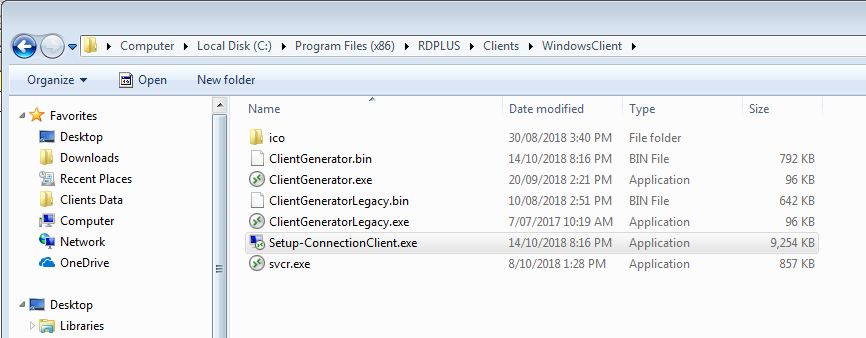
As a pre-requisite on client side, a signed program named “Setup-ConnectionClient.exe” now has to be installed. This program is available on the below path in the RDPlus program folder: RDPlusClientsWindowsClient or alternately you can download it from here. It will locally install the required RDPlus client. Then, the user will just have to double click on the “.connect” file to start his session.
Additional

RDS-Knight
Fully secure your Remote Desktop Services server today with RDS-Knight!
Trial version includes all RDS-Knight Ultimate Protection features, free to use for 2 weeks.
Available here

Server Genius
Start monitoring your Remote Desktop Services server and website today!
This trial version includes all the software features, free to use for 2 weeks.
Available here
Compatibility Update
Use this file when an anti-virus, a Windows Hot Fix or Service Pack has corrupted RDPLUS.
To be used as per support’s instrutions.
Available here
Universal Printer Driver
Use this file to re-install the Universal Printer. To be used as per support’s instrutions.
Available here
Documentation
Frequently asked questions.
RDPlus – Quick Installation Guide
New to RDPlus? This will get you started. A brief description of the system requirements and basic configuration is included in this manual.
A more complete guide with advanced configuration settings as Client Generation, Web server, RDPlus security, etc.